The humble computer mouse has evolved far beyond its original role. In 2026, organizations expect their pointing devices to boost productivity, comfort, and brand image. Rather than treating mice as throwaway peripherals, OEM-muis buyers view them as strategic assets. Workplaces and gaming labs alike demand devices optimized for specific tasks and users. This shift means one-size-fits-all models fall short. Instead, standout mouse products combine targeted features – from custom button layouts and sculpted grips to high-end sensors and eco-friendly materials. Manufacturers and suppliers that deliver these differentiated capabilities will capture the attention of IT procurement and product managers.
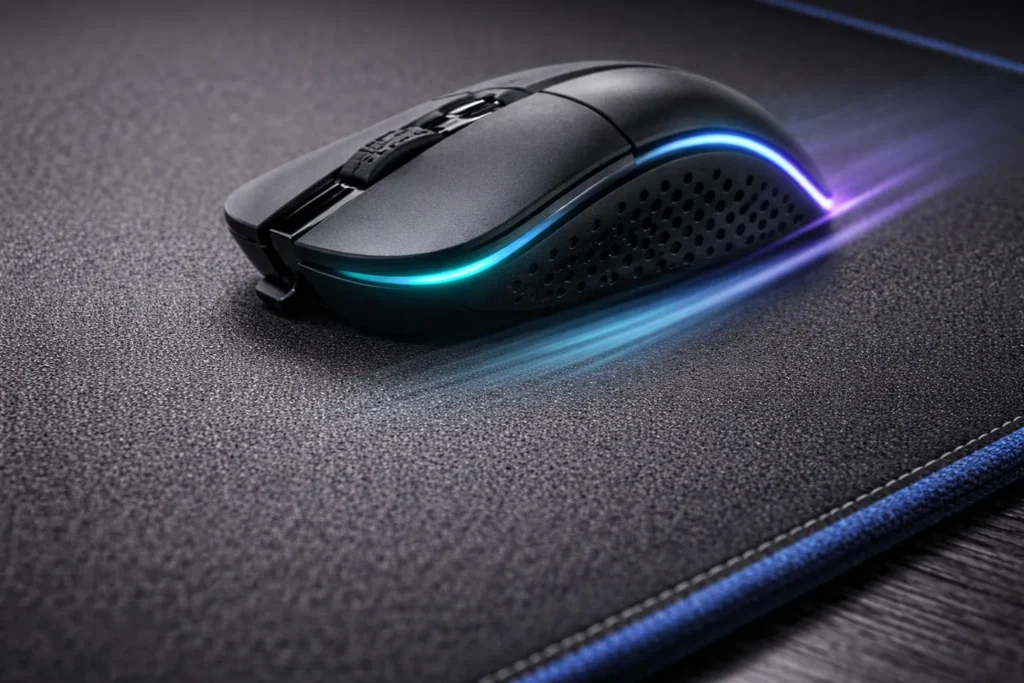
Today’s mouse market is segmented into specialized categories: office mice, gaming mice, ergonomic vertical or trackball designs, and even niche models for designers or health-care. Each segment has distinct requirements. For example, an OEM-muis for a data-entry environment prioritizes durability and comfort, while a gaming-oriented model emphasizes ultra-high sensor accuracy and rapid response. Procurement teams now evaluate mice on factors like connectivity options (multi-device Bluetooth or USB-C), battery life, programmable keys, and environmental credentials. Buyers are comparing suppliers not just on price, but on long-term value: durability, warranty terms, and ease of integration into enterprise IT systems.
Market Trends and Procurement Focus
The global mouse market remains robust. Wired and wireless mice together represent a multibillion-dollar industry. For instance, the wired mouse segment alone is expected to be about $2.5 billion in 2025 and grow modestly. Gaming peripherals drive much of this growth; gaming mice sales are rising with esports popularity. In contrast, basic office mice are high-volume but lower-margin. Leading brands (Logitech, Razer, Corsair, etc.) dominate much of the market share, yet B2B buyers often rely on OEM channels through manufacturers like HP, Lenovo or specialist ODMs for custom-branded designs. In short, buyers can no longer treat mice as commodity bulk buys.
Key procurement trends include:
- Customization and Segmentation: IT teams specify mice that fit user profiles – vertical ergonomic models for repetitive-strain prevention, high-DPI models for designers, or budget models for classrooms.
- Wireless Connectivity & Battery: Modern workstyles demand robust wireless or dual-mode (Bluetooth + RF) mice. Long battery life (or fast-charging USB-C) and effortless switching between devices are now expected.
- Ergonomics & Wellness: Rising focus on employee health means ergonomic design is mission-critical. Contoured shapes, adjustable angles, and grip variety reduce wrist strain. In fact, ergonomic mice sales are growing as awareness of RSI (repetitive strain injury) climbs. Companies with wellness programs often upgrade equipment to prevent fatigue and injury.
- Sustainability & Lifecycle Cost: Environmental concerns drive demand for recyclable plastics and minimal packaging. Also, buyers consider total cost of ownership – preferring mice built to last (3–5+ years) rather than disposable units. Serviceability (modular parts, firmware updates) and longer warranties signal better value.
- Integration & Software: Buyers look for mice whose drivers and software work seamlessly across OS platforms. Features like onboard memory for profiles, cloud-syncable settings, and IT-management compatibility (e.g. mass firmware updates) add appeal.
Supporting Data: The ergonomic mouse market (~$1.45B in 2024) is growing ~5% annually. Vertical ergonomic designs alone now make up ~35% of ergonomic mouse sales. Meanwhile, enterprise buyers account for the bulk of such purchases, often driven by corporate health policies. These figures underscore that specialized ergonomic and high-precision models are in rising demand, not generic ones.
Prioritizing Ergonomics and Comfort
Ergonomics is one of the top differentiators in 2026. A comfortable ergonomic design can reduce worker fatigue and absenteeism. Modern mice come in many shapes: traditional ambidextrous, right/left-hand specific, vertical (thumb-up), trackball, or even rollerbar types. Each form factor targets a certain grip style or use case. Key ergonomic features include:
- Sculpted vertical or tilted bodies to maintain neutral wrist posture.
- Lightweight designs (often <70–90g for gaming mice) to minimize arm fatigue during long sessions.
- Swappable or textured side grips, adjustable palm rests, and thumb supports for custom comfort.
- Low-click resistance and silent switches to reduce finger strain over thousands of clicks.
Ergonomic mice account for a large share of the market. In fact, over 60% of office workers experience discomfort with standard mice, driving a 25%+ annual jump in ergonomic mouse adoption. For brand decision-makers, this means even a marginal improvement in design can influence procurement choices. OEM buyers often perform user trials or consult ergonomics experts. Showing certifications (e.g. TÜV or user-study validations) can set a mouse supplier apart. Additionally, flexible features—like customizable weight systems or adjustable DPI for different tasks—further enhance user comfort and productivity.
Table: Ergonomic Form Factors
| Mouse Form Factor | Description & Benefits | Typical Use Case |
|---|---|---|
| Vertical / Tilted | Handshake grip reduces forearm twist | Office, prolonged use |
| Ambidextrous | Symmetrical shape for either hand | General office use |
| Sculpted for Right/Left Hand | Curved body fits hand contour | Gaming, design |
| Trackball/Baseball | Stationary base with ball for cursor control | CAD, accessibility |
| Thumb-Operated (e.g. bar) | Finger or thumb roller, minimal wrist motion | Architects, graphics |
Each segment has its champions. Vertical mice are surging as companies push ergonomics: one report notes a CAGR of ~8-10% for vertical models. In procurement RFPs, specifying hand-specific molds and anti-slip coatings is common. Ultimately, ergonomic design isn’t a gimmick but a clear performance factor.
Sensors, Resolution, and Performance
Behind the shell, sensor technology is critical. Sensor accuracy and DPI (dots per inch) determine how precisely and smoothly the cursor moves. By 2026, high-end optical sensors rival laser technology in resolution and accuracy. Key points:
- DPI Settings: Most modern mice offer adjustable DPI, often from ~800 up to 16,000 or more. Lower DPIs (~800–1,600) suit precision work or office tasks, while gamers and graphic designers may use 3,000–8,000+ DPI for rapid cursor movement on large or multi-monitor setups. High DPI isn’t always “better” – many pro gamers favor 400–1,600 DPI for controlled, repeatable motions. The table below illustrates typical DPI ranges and uses.
| DPI Range | Typical Use Case | Opmerkingen |
|---|---|---|
| ≤1,000 DPI | Office productivity, general use | Affordable office mice (~1000 DPI) |
| 1,000–3,200 DPI | Mainstream/gaming | Standard for most users and gamers |
| 3,200–8,000 DPI | Competitive gaming, high-res monitors | High sensitivity requiring low hand movement |
| >8,000 DPI | Specialist gaming/design | Rarely needed for accuracy; used for quick sweeps |
- Sensor Type: Optical (LED) sensors vs. Laser (IR) sensors remain the two main technologies. Optical sensors, which track reflected light off surfaces, offer very consistent tracking on mousepads and matte desks. Laser sensors penetrate more surfaces (including glass) but can be too sensitive at very low speeds, sometimes causing jitter. In practice, most competitive users and designers prefer optical sensors for their stability. However, wireless convenience and multi-surface performance have led to hybrid sensors (like BlueLED or proprietary tech) on some models.
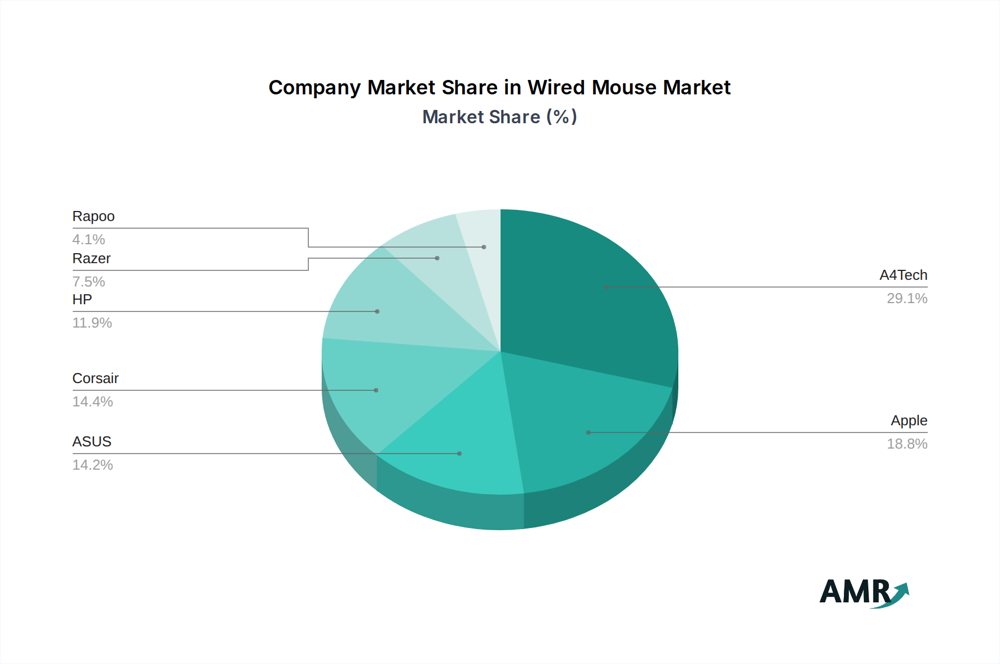
Pie chart showing market share of leading wired-mouse manufacturers (~29% A4Tech, ~19% Apple, etc.).
- Polling Rate and Latency: High-end mice boast up to 1,000 Hz polling (1 ms response) for tournament play. Even office models are improving in this area. For B2B clients, low latency is a reliability metric: lag or jitter can disrupt tasks like CAD work or fast data entry. Wired connections still offer the ultimate low-latency solution, which is why some enterprises stick with USB mice for critical applications. Wireless tech (Bluetooth 5.x, 2.4 GHz dongles) now approaches wired responsiveness while freeing desk space, a key factor for hybrid work setups.
Table: Sensor Types Comparison
| Sensor Type | Light Source | Surface Compatibility | High DPI Range | Pros / Cons |
|---|---|---|---|---|
| Optical (LED) | Visible LED | Cloth mousepads, matte surfaces | Up to ~12,000 | Stable tracking, low jitter; limited on glass |
| Laser | Infrared | Almost any surface including glass | >16,000 | Works on any surface; may introduce micro-jitter |
| Other (Blue LED, IR-I) | Blue/Infrared LEDs | Various surfaces | Moderate (≤10,000) | More surface tolerant than red LED; niche use |
Continuous improvements are pushing optical sensors ever higher in DPI and accuracy. Some wireless gaming mice now claim “8K sensors” (8,000 Hz polling) for ultra-smooth tracking. For B2B buyers, it’s key to validate sensor specs through independent tests or standards (e.g. PixArt chipset data).
Connectivity and Power Management
Connectivity features are now table stakes for standout mouse products. Buyers expect seamless pairing with laptops, tablets, and multi-PC setups. Important facets include:
- Wireless Standards: Bluetooth 5.x, Wi-Fi, or proprietary dongles (2.4 GHz USB) with secure pairing. Dual-mode mice that switch between Bluetooth and RF suit modern digital workplaces. Having multiple profiles (for switching between Windows, Mac, etc.) is a plus. According to industry reports, innovations in connectivity (Bluetooth 5.0, Wi-Fi 6) and battery life are major growth drivers.
- Battery Life & Charging: Long-lasting rechargeable batteries (100+ hours on a charge) and fast-charging (minutes for hours of use) are critical for enterprise fleets. Many 2026 models feature USB-C or Qi wireless charging. Supplier reliability on battery specs is important: procurement asks for UL or equivalent certifications.
- Integration: Some advanced mice now include security dongles or encryption for sensitive environments. Others integrate Bluetooth Low Energy to coexist with IoT devices. As remote work grows, dual-host mouse (connecting to PC and smartphone) is emerging.
B2B decision-makers will examine whether the mouse can be managed at scale: for example, can IT disable unused wireless modes for security, or deploy firmware patches centrally? Demonstrating robust multi-device interoperability (per [13]) and quick reconnect times will make a mouse stand out in RFP evaluations.
Software, Customization and User Experience
Modern mice come with companion software for deep customization. Key software features that impress B2B customers include:
- Programmable Buttons & Profiles: Ability to reassign side-buttons or scroll-wheel functions via software, and switch between profiles on-the-fly. This is valuable for power users and gamers alike.
- Onboard Memory: Stores user profiles directly on the mouse, so settings persist across PCs without reinstallation. This appeals to enterprise IT simplifying deployments.
- Cross-Platform Drivers: Unified software for Windows, macOS, and Linux eases corporate rollout. Some companies prefer mice that can operate with no software on locked-down terminals.
- Analytics & Ergonomic Aids: An emerging trend (especially in vertical/health-focused mice) is to include built-in sensors or apps that remind users to take breaks or monitor usage patterns (a nod to future smart peripherals). While optional, such features can differentiate a brand as forward-thinking.
Under the hood, proprietary firmware optimizations (for pointer smoothing, surface calibration, etc.) also count. Buyers may request stability testing results or ISO certifications from suppliers to ensure the driver software is robust.
Materials, Build Quality, and Sustainability
The mouse shell and components convey quality. Typical materials:
- Plastics: High-grade ABS and PC-ABS blends are common for mainstream models. They provide good durability and ease of molding. For premium models, injection-molded polycarbonate can add rigidity and shine.
- Metal Alloys: Some high-end or industrial mice use aluminum or magnesium alloy chassis. These feel premium and dissipate heat, but cost more. Magnesium shell mice (e.g. some gaming brands) are surprisingly light yet strong.
- Carbon Fiber and Composites: Cutting-edge designs experiment with carbon fiber or reinforced polymers for ultra-light yet rigid frames. These materials reduce weight and flex.
- Sustainable Materials: Eco-brands use recycled plastics, bamboo, or even biodegradable polymers. While niche, offering a sustainable version (even with a small markup) can appeal to CSR-focused clients.
| Shell Material | Kenmerken | Overwegingen |
|---|---|---|
| ABS kunststof | Affordable, lightweight, shock-resistant | Standard for OEM-muis builds; cost-effective |
| PC-ABS (Polycarbonate) | Harder, higher impact resistance | Mid-range/industrial use; premium feel |
| Aluminum Alloy | Rigid, sleek finish | Premium/military-grade models; more costly |
| Magnesium Alloy | Very strong, lightweight | High-end gaming or industrial; expensive |
| Carbon Fiber | Extremely stiff, ultra-light | Cutting-edge gaming/performance; high cost |
| Recycled Plastics | Variable (depends on source) | Eco-friendly image; sourcing may vary |
Durability is equally crucial. Procurement teams often require mice to pass stress tests (drop, click lifespan, abrasion). A higher click-cycle rating (e.g. Omron switches rated for 50+ million clicks) is a selling point. Highlighting dust/water resistance (e.g. IP54 rating) also helps in industrial or healthcare contexts. The market report notes a growing focus on robust build quality and long lifespan.
Meanwhile, corporate buyers increasingly demand supply chain transparency. Having certifications (RoHS, REACH) for materials and waste disposal shows trustworthiness. Some companies even audit their mouse leverancier’s factories for ethical practices. Thus, stating compliance with environmental standards or offering take-back recycling programs can make a product stand out.
Total Cost of Ownership and Reliability
Beyond specs, B2B customers care about lifecycle costs. A higher initial price can be justified by lower downtime and replacement rates. Key assurances include:
- Warranty & Support: Multi-year warranties, on-site or advance-replacement services. Companies will evaluate the supplier’s support network and response times.
- Field Serviceability: Mice designed with replaceable parts (e.g. swappable feet or buttons) extend service life. Some enterprise models allow easy battery replacement or firmware restoration.
- Consistency: Batch-to-batch consistency (consistent button feel, tracking, etc.) is vital for bulk orders. Brands often provide sample pre-production units for validation.
- Certifications: Compliance with ISO quality standards or being an authorized distributor can sway large buyers.
In practice, procurement teams may pilot a new mouse with a small user group to verify its reliability. Having documented reliability data or testimonials from other corporations adds credibility. In-text reliability metrics (e.g. MTBF of wireless link) or LED indicator of connection status can also influence a deal. Remember: a mouse failure in a high-productivity or gaming setting can disrupt work and requires immediate replacement. Thus, emphasize that your mouse is built to minimize such risks.
Innovation and the Road Ahead
Looking to the future, several innovative features are emerging:
- AI and Smart Features: Premium models are experimenting with on-device AI – for example, adaptive sensors that learn a user’s sensitivity preferences over time. Gesture recognition (swipe motions) and voice assistant integration are niche ideas under development.
- Modularity: The concept of a modular mouse (e.g. swappable button modules or exchangeable modules for left/right-handed use) is being explored by some OEMs. This could allow a single product platform to serve diverse needs.
- Health Monitoring: In medical or high-precision fields, prototypes include biometric sensors (like pulse monitors on grips) or antibacterial coatings for hygiene, though these remain futuristic.
- Ecosystem Integration: Think beyond the mouse – integration with software suites or IoT devices. For example, a mouse could lock the screen when away or interact with AR/VR systems.
For now, buyers should watch how these trends mature. Market studies emphasize that innovation-driven differentiation (AI, wireless charging, enterprise software features) will define winners. That means OEMs and suppliers who invest in R&D and provide upgrade paths will earn buyer trust.
Conclusion and Call to Action
A standout mouse product in 2026 is one that holistically addresses user needs and market trends. Ergonomic comfort, sensor accuracy, reliable connectivity, and sustainable design are all must-haves. Backing up claims with data (e.g. sensor specs, ergonomic certifications, durability tests) builds trust among B2B buyers. Decision-makers want evidence: whether it’s DPI benchmarks, lifespan tests, or customer success stories in similar deployments.
In summary, to differentiate your mouse:
- Design with the end user in mind (reduce strain, boost efficiency).
- Use advanced yet proven components (modern sensors, robust materials).
- Provide flexible features (wireless modes, software profiles) and solid support.
- Highlight your OEM credentials: factory certifications, quality systems, and service offerings.
For OEM buyers seeking custom solutions, partnering with a knowledgeable mouse supplier is key. If you’re sourcing a next-generation mouse or enhancing your brand’s offering, evaluate vendors on these factors. Contact [Company/Your Brand Name] today to learn how we deliver high-performance, ergonomic, and reliable mouse devices tailored for 2026 and beyond.
Reach out to our sales or engineering team to discuss custom mouse design and bulk procurement. Let us help you create the perfect mouse solution that maximizes productivity and user satisfaction.